Our product rankings are based on analysis of thousands of customer reviews, brand reputation, pricing trends, and popularity data. They represent our honest opinion and are intended as a helpful starting point for your research. Some links on this site are affiliate links — if you buy through them, we may earn a small commission at no extra cost to you. This helps us keep the site free and up to date.
3D colour scanners record an object's surface texture as well as its shape, so the finished 3D model shows the real paint, wood grain, labels and skin tones instead of a plain grey mesh. A built-in texture camera photographs the surface while the depth sensors measure it, then the software wraps those images over the model.
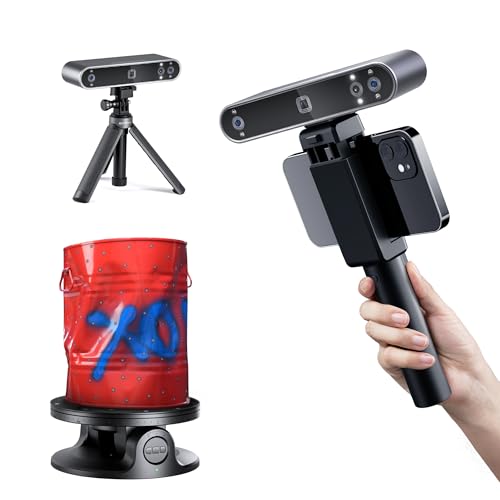
They suit makers, artists, museums, online shops and anyone building models for games, AR or full-colour 3D printing. Most of the range below are handheld 3D scanners; if you only need measurements for CAD, compare our high precision 3D scanners instead.


A 3D colour scanner is a 3D scanner that captures two things at once: the geometry of an object (its shape and size as a point cloud, then a mesh) and its surface texture (the colours and visual detail). Geometry-only scanners give you an accurate but plain grey model. That is fine for engineering, but useless if you want a digital copy that looks like the real thing.
Most current models record 24-bit colour, meaning each pixel of the texture can hold one of around 16.7 million shades. The RGB sensor fires alongside the depth sensors, often with its own flash LEDs, and the 3D scanning software projects those photos onto the mesh as a texture map. The result is a digital twin: a model that matches the original in shape and appearance.
Texture costs speed and memory. The MIRACO, for example, is listed as recording up to 5,000 frames per project geometry-only but up to 4,000 with texture, because every frame now carries a photo as well, and that extra data needs storage. Expect larger files and longer processing when it is switched on.
These are the texture-capable models in our range, with the figures listed for each on Amazon or by the maker. Accuracy figures are best-case single-frame numbers, so compare them like for like.
| Scanner | 3D technology | Texture sensor | Best-case accuracy | Working distance | Use |
|---|---|---|---|---|---|
| Revopoint MIRACO | Quad-camera infrared structured light | 48MP RGB | 0.02mm | 100-1000mm | Standalone, built-in screen |
| Einstar VEGA | Infrared VCSEL + MEMS | 48MP RGB | 0.05mm point distance (HD) | 100-350mm HD, 270-1500mm Fast | Standalone, wireless |
| Revopoint POP 3 Plus | Dual-camera infrared structured light | HD RGB | 0.04mm | 150-400mm | PC or phone, Wi-Fi 6 |
| Revopoint MINI 2 | Blue structured light | RGB, 6 flash LEDs | 0.02mm | 120-250mm | Small, detailed parts |
| Creality Otter Lite | Infrared stereo | 24-bit RGB | 0.05mm | Objects 20mm to 2m | Wired USB 3.0 |
| 3DMakerpro Seal | Blue light structured light | 24-bit | 0.01mm (listed) | - | Small parts, 10fps |
| Creality Ferret Pro | Infrared | Full colour | 0.1mm | - | Budget, Wi-Fi 6 |
The pattern is clear: the two 48MP models give the most detailed texture and work without a laptop, the 190g POP 3 Plus is the easy all-rounder, and the blue light MINI 2 and Seal trade working distance for fine detail on small objects.
Texture capture matters whenever the model has to look like the real object. It is wasted effort if you only need measurements.
For reverse engineering, inspection and scan-to-CAD work, the texture adds file size and nothing else. Most of these scanners let you switch it off, which speeds up each scan.
Infrared scanners such as the MIRACO, VEGA, POP 3 Plus and Otter Lite are the usual choice for textured work. Their 3D light is invisible, so it does not tint the photos, and they handle bigger subjects, including people. Blue light and blue laser 3D scanners capture finer detail and cope better with dark or shiny surfaces, but they are built for small parts. Where they offer texture, it comes from a separate sensor, as on the MINI 2 with its six flash LEDs. If your main goal is a sharp mesh rather than a lifelike texture, our structured light 3D scanners explain the trade-offs in more detail.
More megapixels give a crisper texture. The jump from HD or 2MP sensors to 48MP on the MIRACO and VEGA is easy to see on lettering, fabric and fine paintwork. Built-in LEDs matter too: they keep the shades consistent when the room light changes.
Match the scanner to what you scan most. A 120-250mm window (MINI 2) suits jewellery and miniatures; 150-400mm (POP 3 Plus) suits shoes, helmets and figures; a 1,000mm-plus range (MIRACO, VEGA Fast mode) copes with furniture, cars and people. See scanners for small objects and scanners for large objects for more options at each end.
Standalone units with a screen and processor (MIRACO, VEGA) are the easiest way to scan outdoors or on location. Tethered models are lighter and cheaper but need a laptop or desktop PC with a decent graphics card, and texture mode raises the load on it. A desktop 3D scanner with a turntable is another option if everything you scan fits on a bench. Our wireless 3D scanners list covers the cable-free options.
Check the export options before you buy. OBJ (with its texture image) and PLY keep the texture; STL stores geometry only, so a scan saved that way loses its colour. For multi-colour 3D printing, 3MF works too. Revopoint uses Revo Scan, Shining 3D uses StarVision for the Einstar range, and Creality uses Creality Scan, all of which include texture tools.
Texture capture is no longer a professional-only feature. The Ferret Pro and Otter Lite bring 24-bit colour to entry level 3D scanners, while the 48MP standalone models sit nearer professional 3D scanners.
Photogrammetry builds a model from dozens or hundreds of ordinary photos and can give excellent texture, but it is slow, needs careful lighting and a lot of clean-up, and struggles with plain or shiny surfaces. A dedicated scanner gets accurate geometry and texture in one pass in minutes, which suits anyone doing 3D scanning regularly. Some professional workflows, such as Artec Studio, combine both: scanner geometry with texture from a DSLR for the most realistic result.
Yes, if it has an RGB texture camera. All of the 3D colour scanners in this range do, from the budget Creality Ferret Pro to the 48MP Revopoint MIRACO. Some metrology scanners and blue laser handhelds capture geometry only, so check for "colour scanning: yes" in the specs.
OBJ (with its texture image file) and PLY. STL has no colour. Einstar lists PLY, STL, OBJ and ASC export for the VEGA (VEGA specifications).
Some do. The Revopoint MINI 2 and 3DMakerpro Seal add a texture sensor to their blue light, but they are built for small, detailed objects. For larger textured subjects an infrared model is usually better.
Yes, with a multi-colour printer and a format that keeps the texture, such as OBJ or 3MF. Multi-material filament printers can approximate colour from a scan; full-colour resin and inkjet-based machines get much closer to the original.
Infrared models can, because the light is eye-safe Class 1 and the working distance is long enough for a head or full body. The maker says the Otter Lite handles objects up to 2m, which covers a standing person, though the person needs to stay very still.
On Amazon UK the main names are Revopoint, Shining 3D (Einstar and EinScan), Creality and 3DMakerpro. Browse our Einstar 3D scanners and Creality 3D scanners for each brand's full line-up.